How the Catalog Product Template Streamlines Design for Real-World Projects
If you're someone who regularly works with print or digital materials—whether it's for a small business, creative project, or personal use—you know how time-consuming it can be to start from scratch every time. That’s where the Catalog product template comes in handy. Designed as a ready-to-use layout, it allows users to quickly build professional-looking catalogs without needing advanced design skills or hours of work. The template is crafted in Adobe InDesign and offers a high-quality, fully editable format that adapts to various needs, making it an excellent choice for entrepreneurs, marketers, educators, and more.
What Is the Catalog Product Template?
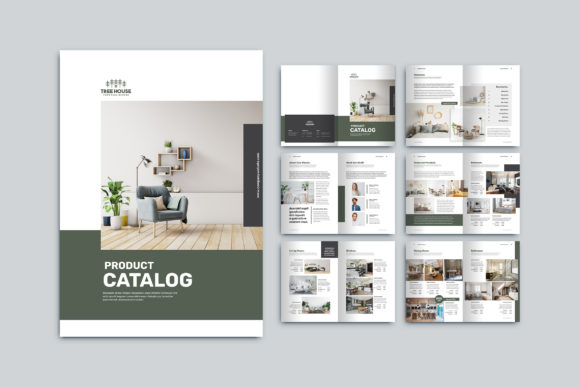
The Catalog product template is essentially a pre-designed document structure optimized for showcasing products. It includes 12 custom pages formatted at A4 size (21cm x 29.7cm), ensuring compatibility with most printing services. Built using CMYK color mode and set to 300 DPI resolution, it's ready for print with a 3 mm bleed included. This makes it ideal for businesses or individuals who need sharp, vibrant visuals that won't distort during production.
One of the standout features is its smart layer system. Each element—text, images, and fonts—is neatly organized, so even if you're new to InDesign, you can easily replace content without messing up the layout. Plus, free fonts are embedded, removing the hassle of sourcing additional typefaces.
Who Can Benefit from Using This Template?
This template isn’t just for designers. Its versatility means it fits into a wide range of scenarios:
- Entrepreneurs launching a new product line can use it to create a clean, modern catalog that impresses potential customers.
- Freelancers and creatives might repurpose it for client portfolios, especially when presenting tangible items like fashion lines, furniture designs, or handmade goods.
- Marketing teams can generate consistent brand collateral across campaigns, saving hours on formatting and layout adjustments.
- Small business owners can showcase their offerings in a polished way, whether for in-store displays or online PDF versions.
- Educators may find it useful for creating course materials or promotional brochures for school events, workshops, or training programs.
Real-Life Use Cases
Let’s take a look at some practical examples of how this template could be used in everyday situations:
- Local Retailer Showcasing Seasonal Items: Imagine you own a boutique that sells home décor. As the holidays approach, you want to promote your latest collection. Instead of hiring a designer, you download the Catalog product template, plug in your photos, adjust the text to highlight your seasonal deals, and send it off for printing. The result? A professional catalog that looks handcrafted but was built in minutes.
- Freelance Photographer Creating a Print Portfolio: You’re a wedding photographer looking to present your work in a physical portfolio. You modify the template by swapping out sample product images with your best shots, tweak the fonts to match your branding, and print it in full CMYK color. The final product feels premium and gives clients something tangible to take home and review later.
- Startup Pitching Investors: When pitching your product-based startup, you need a compelling visual aid. By customizing the Catalog product template, you can create a sleek, high-resolution booklet that clearly outlines your offerings, pricing, and value proposition. The clean layout and professional finish help build credibility and trust with investors.
- Event Planner Advertising Services: You offer event planning services and want to distribute a brochure at local fairs. The template helps you organize different sections—like venue options, catering partners, and past event highlights—into a visually appealing and easy-to-read format. The A4 size also makes it convenient for handing out or placing in mailers.
Why Choose the Catalog Product Template Over Other Options?
Many templates promise ease of use, but few deliver the flexibility and quality of the Catalog product template. Here's why it stands out:
- No Loss of Quality: Because it's designed at 300 DPI and uses vector graphics, scaling and printing won’t lead to pixelation or blurry images.
- Time Efficiency: With all the structural elements already in place, you can focus on adding your unique content instead of wrestling with layout tools.
- Customization Freedom: Whether you want to change the number of pages, swap images, or adjust colors, the template supports these changes seamlessly thanks to its smart layers and organized file structure.
- Cost Savings: Avoid the expense of hiring a designer for simple layouts. Just edit the .indd or .idml files and you're good to go.
For example, a blogger running a lifestyle website recently used the Catalog product template to create a printable guide for DIY skincare products. They replaced the default images with step-by-step visuals, added their branded fonts, and published both a digital version and printed copies for subscribers. The process took under two hours, and they received positive feedback from readers who appreciated the tactile experience of the printed guide.
Considerations Before Downloading or Using the Template
While the Catalog product template is highly adaptable, there are a few things to keep in mind before diving in:
- Design Experience: Although the template is user-friendly, having a basic understanding of Adobe InDesign will make the customization process smoother. If you're not familiar with the software, consider spending some time learning the essentials, such as managing layers, adjusting master pages, and exporting correctly for print.
- Image Requirements: Since the preview images aren’t included in the main file, you’ll need to provide your own high-resolution images. Make sure your photos are at least 300 DPI to maintain the template’s professional quality.
- Printing Specifications: While the template is already set for print with proper bleed and resolution settings, always double-check with your printer to confirm they accept A4-sized files in .pdf format. Some printers may require specific trimming or folding instructions.
- Business Needs: Consider what kind of information your catalog should convey. Do you need pricing tables, QR codes, or product descriptions? The template provides a solid foundation, but your content must align with your goals.
How Different Users Might Customize It
Each user has unique needs, which is why the Catalog product template is so valuable. For instance:
- A clothing brand owner might add fabric swatches and model photos to each page, using the template’s structured layout to highlight different styles and collections.
- An educational institution could convert it into a course catalog, replacing product details with class schedules, instructor bios, and student testimonials.
- A digital marketer might use it for a lead magnet—a downloadable PDF catalog that prospects receive after signing up for a newsletter or webinar. The template ensures the material looks professional and credible.
- A nonprofit organization could tailor it into a fundraising catalog, featuring donor recognition, campaign updates, and impact stories in a visually engaging format.
By tailoring the template to fit specific needs, users avoid generic, one-size-fits-all solutions and end up with a resource that truly represents their brand or message.
Maximizing Value: Tips for Getting the Most Out of the Template
To ensure your Catalog product template serves you well, here are a few tips:
- Plan Your Content Structure: Before opening InDesign, outline what each page will contain. This saves time and prevents confusion later.
- Use High-Quality Assets: Low-res images or mismatched fonts can ruin the template’s professional look. Stick to the recommended font types and source images from reputable stock libraries or your own photography.
- Test Print a Sample Page: Always do a test print to check colors, alignment, and image clarity. What looks good on screen may not translate perfectly to paper.
- Export Properly for Digital Use: If you plan to share the catalog online, export it as a PDF with embedded fonts and optimize the resolution for web viewing. This keeps the file size manageable while preserving readability.
- Update Regularly: If you're using the catalog for ongoing promotions or product launches, keep the template updated. The editable nature of the file makes it easy to refresh content without starting over.
When Not to Use the Catalog Template
Even though the Catalog product template is versatile, it's not suitable for every project. Here are a few cases where it might not be the best option:
- If you're designing for non-A4 formats, such as US letter or custom sizes, you may need to adjust the template or choose another one altogether.
- If your project requires animation or interactive elements (e.g., a digital flipbook), InDesign's static nature could limit your creativity. In such cases, consider pairing the catalog with other digital tools.
- If you have no access to Adobe InDesign, the .indd and .idml file types won’t open directly. You'll need either the full version of InDesign or compatible alternatives like Affinity Publisher or cloud-based editors.
Final Thoughts on Practical Applications
In today’s fast-paced world, efficiency and professionalism often go hand-in-hand. The Catalog product template bridges the gap between the two by offering a streamlined yet polished solution for those who need to present products effectively. Whether you're a small business owner preparing for a trade show, a freelancer building a portfolio, or an educator compiling a workshop guide, this template can simplify your workflow and enhance your output.
Its compatibility with Adobe InDesign, high-resolution formatting, and smart layer system make it a reliable tool for real-world applications. But remember, the true power of the template lies in how you use it. With thoughtful customization and attention to detail, you can turn a standard design into a powerful asset for your audience.