Sembako - Business PowerPoint Template: A Multipurpose Tool for Professional Presentations
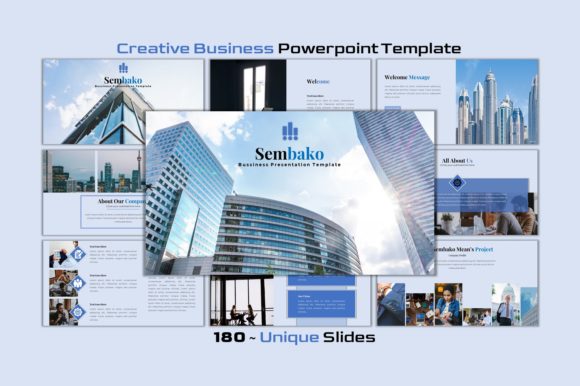
When it comes to creating compelling presentations, the right tools can make all the difference. The Sembako - Business PowerPoint Template and its creative variant offer a streamlined solution for users who want a professional yet versatile design without the complexity of external software. This template is ideal for business professionals, entrepreneurs, educators, or anyone in need of visually engaging slides that are easy to customize. With over 180 unique slides and a range of features designed for efficiency, Sembako provides a solid foundation for both corporate and personal projects.
What Is Sembako - Business PowerPoint Template?
The Sembako - Business PowerPoint Template is a comprehensive presentation toolkit built entirely within Microsoft PowerPoint. It includes a variety of slide layouts suitable for different types of content, such as data visualization, project planning, marketing strategies, and more. Unlike many templates that require Adobe Illustrator or other graphic design programs for editing, all elements in Sembako are fully editable using just PowerPoint. This means you can resize graphics, change fonts, adjust colors, replace images, and tailor each slide to your specific needs—all within a single platform.
Why People Choose Sembako
Presenters often look for templates that balance aesthetics with functionality. Sembako delivers both by offering modern designs that align with current trends while maintaining a clean and professional structure. Its popularity stems from several key factors:
- Time Efficiency: Users appreciate not having to switch between applications to edit their slides. Everything is handled within PowerPoint, reducing workflow interruptions.
- Design Flexibility: The inclusion of multiple fonts—Poppins, Playfair Display, and Montserrat—allows for a personalized aesthetic that suits various industries and preferences.
- Extensive Content Options: With over 180 unique slides, this template ensures there’s a layout available for nearly any type of presentation, whether you're pitching a business idea or summarizing research findings.
- High-Quality Visuals: The template integrates thousands of icons and photos sourced from platforms like Pexels and Unsplash, giving presenters access to royalty-free imagery that enhances visual appeal without copyright concerns.
Key Features and Benefits
Sembako's value lies in its thoughtful feature set, which caters to both novice and experienced PowerPoint users. Some standout features include:
- All Elements Editable: From vector graphics to text boxes, every component is customizable directly in PowerPoint, eliminating the need for advanced design skills.
- Drag-and-Drop Image Placeholders: Inserting your own images is simple and intuitive, making it easy to maintain brand consistency or highlight specific visuals.
- Color Customization: The template supports color changes, enabling users to match their company branding or adapt the theme to suit different audiences or events.
- Included Files: In addition to the main .pptx file, Sembako also provides an icon .pptx file and high-resolution mockups, ensuring you have everything you need at your fingertips.
- Map Infographics: Ideal for geographic data representation, these infographics add depth and clarity to location-based content or market analysis.
These features collectively reduce the time spent on formatting and allow presenters to focus on delivering meaningful content. For those who prioritize ease of use and adaptability, Sembako offers a strong return on investment in terms of productivity and presentation quality.
Considerations and Tradeoffs
While Sembako presents numerous advantages, it's important to consider how well it fits your specific needs. Here are some points to evaluate:
- Learning Curve: Although the template is user-friendly, individuals unfamiliar with PowerPoint's advanced customization options may need some time to adjust.
- Customization Limits: While most elements are editable, there may be certain design constraints if you aim for highly unique or unconventional layouts.
- Cost vs. Value: As with any premium template, the price point should be weighed against the potential time saved and the professional appearance it brings to your slides.
- Content Suitability: If your presentation requires heavy animation or video integration, Sembako may not offer the same level of support as specialized multimedia-focused templates.
It's also worth noting that the abundance of pre-designed slides can sometimes lead to decision fatigue. Choosing the right layout for each section of your presentation may take longer than expected, especially for complex projects with diverse content types.
When Sembako Is a Strong Fit
Sembako shines in scenarios where speed, simplicity, and a polished look are essential. Consider using it when:
- You're preparing a business proposal, startup pitch, or investor presentation that requires a clean, professional design.
- Your workflow relies heavily on PowerPoint, and you want to avoid the hassle of learning new software or importing assets from elsewhere.
- You need a template with ready-made infographic elements, such as timelines, flowcharts, or map-based visuals, to convey complex information clearly.
- You're working on a team project and want everyone to use a consistent style without compromising individual creativity.
Its versatility makes it a good fit for both short meetings and extended reports. The template is particularly effective for individuals who may not have access to graphic design tools but still want their presentations to look professional and visually appealing.
When Alternatives Might Be Better
Despite its strengths, Sembako isn't the best choice for every situation. You might want to explore alternatives if:
- You require advanced animations or interactive elements that go beyond standard PowerPoint capabilities.
- Your industry has very specific design standards or branding guidelines that the template doesn’t easily accommodate.
- You prefer a minimalist approach and find the included features too elaborate or overwhelming.
- You're looking for templates integrated with Canva or Google Slides for cross-platform collaboration or mobile editing.
In such cases, comparing Sembako with other PowerPoint templates or even switching to a different format altogether could help you better meet your goals.
Decision-Making Insights
Before committing to Sembako, ask yourself the following questions:
- Do I need a template that works exclusively within PowerPoint, or am I open to using other tools for enhanced design flexibility?
- How much time do I want to spend customizing my slides versus building them from scratch?
- Will the font options and color schemes align with my existing branding materials?
- Am I comfortable managing large numbers of slides and icons, or would I benefit from a more simplified template?
Additionally, consider testing the template with a sample presentation before purchasing. Many users find that trying out a few slides gives them a clearer sense of how the template will perform in real-world conditions.
Final Thoughts
The Sembako - Business PowerPoint Template is a robust option for those seeking a multipurpose, easy-to-edit solution for their presentation needs. Its combination of high-quality visuals, extensive slide library, and compatibility with common image sources makes it a practical choice for a wide audience. However, its suitability depends on your specific requirements, technical comfort level, and the nature of your content. By carefully evaluating your priorities and experimenting with the template, you can determine whether it’s the right fit for your next project.